15 min readCase studies
A Production K3s Cluster on Hetzner: the Terraform, the Bill, the Trade-offs
Our five-node production K3s cluster on Hetzner Cloud cost €131.12 in October 2026. The month-by-month bill, the April price increase, the move from ARM to x86, the Terraform behind it, and what the same shape costs on EKS at list price.
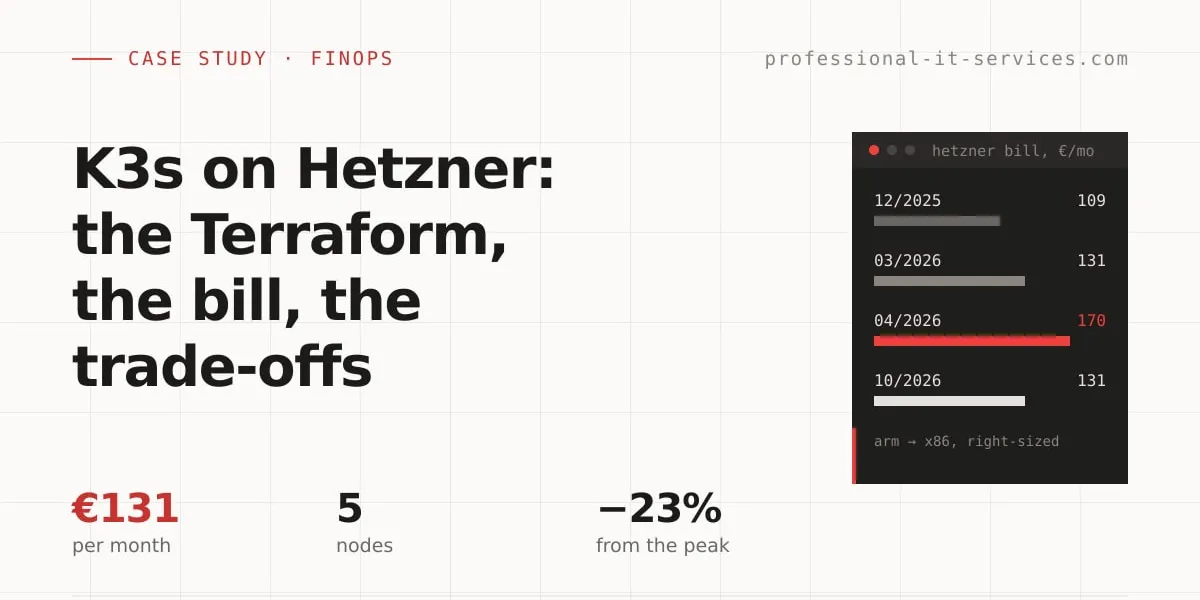
A five-node production K3s cluster on Hetzner Cloud cost us €131.12 in October 2026, excluding VAT: one ARM control-plane node, four x86 workers with 40 vCPU and 80 GB of RAM, 510 GB of volumes, a load balancer, object storage and a Storage Box. It started at €109.24 in December 2025 and peaked at €170.05 after Hetzner’s April 2026 price increase.
The October bill is back at the level of March, before the increase, but it buys about 30% less worker capacity. That is right-sizing, not a loss: real CPU use on the workers is between 0 and 12%. Below are the invoices line by line, the Terraform, three things that broke, what we gave up against managed Kubernetes, and a list-price comparison with Amazon EKS.
All Hetzner figures come from our own invoices, in euros, excluding VAT. The cluster is pits-prod-fsn1-cluster-01, our own production platform; the same review runs on client clusters as part of our DevOps plans.
The bill at a glance
| Usage month | Cluster | Storage (Object Storage + Storage Box) | Total | What changed |
|---|---|---|---|---|
| 12/2025 | 101.05 | 8.19 | 109.24 | All ARM: 2× CAX11, 3× CAX31, 1× CAX41 |
| 03/2026 | 122.40 | 8.19 | 130.59 | 1× CAX11, 1× CAX31, 3× CAX41 |
| 04/2026 | 160.36 | 9.69 | 170.05 | Hetzner price increase, identical servers |
| 06/2026 | 148.52 | 9.69 | 158.21 | ARM → x86 migration month, old and new nodes overlap |
| 07/2026 | 125.28 | 9.68 | 134.96 | 1× CAX11, 1× CAX41, 3× CX43 |
| 09/2026 | 124.71 | 9.69 | 134.40 | Last ARM worker replaced by a CX53 on 29 September |
| 10/2026 | 121.43 | 9.69 | 131.12 | 1× CAX11 master, 3× CX43, 1× CX53 |
What does a production K3s cluster on Hetzner cost per month?
Here is the October 2026 invoice, every line of it:
| Line | € / month | Share |
|---|---|---|
| 3× CX43 workers (8 vCPU / 16 GB each) | 47.97 | 37% |
| 1× CX53 worker (16 vCPU / 32 GB) | 29.49 | 22% |
| 24 volumes, 510 GB-months | 29.17 | 22% |
| Load Balancer LB11 (plus a second one for 27 hours, €0.30) | 7.29 | 6% |
| Object Storage, base fee | 6.49 | 5% |
| 1× CAX11 control plane (2 vCPU / 4 GB, ARM) | 4.49 | 3% |
| BX11 Storage Box | 3.20 | 2% |
| Public IPv4 addresses | 3.02 | 2% |
| Total | 131.12 |
Volumes are as large a line as the biggest worker. They are easy to leave out of a “Hetzner is cheap” pitch, and they grow quietly: every small database or application claim is its own volume. The control plane is the cheapest server on the bill, a deliberate trade-off covered below.
The cluster runs our own platform: Mailu mail, Nextcloud with Collabora and Talk, a three-node MariaDB Galera cluster, Prometheus, Loki and Grafana, Casdoor SSO, self-hosted GitHub Actions runners (ARC) and three WordPress sites, 122 pods in 24 namespaces. Most websites that used to live here moved to Cloudflare Pages, built by our ForgeStack pipeline.
Why did the bill jump 30% in April 2026?
Because Hetzner raised its prices, and nothing else changed. The servers, the load balancer and the volumes were the same in March and April 2026:
| Line | 03/2026 (€) | 04/2026 (€) | Change |
|---|---|---|---|
| CAX11 | 3.29 | 4.49 | +36% |
| CAX31 | 11.99 | 15.99 | +33% |
| CAX41 | 23.99 | 31.49 | +31% |
| Load Balancer LB11 | 5.39 | 7.49 | +39% |
| Volume, per GB-month | 0.0440 | 0.0572 | +30% |
| Object Storage, base fee | 4.99 | 6.49 | +30% |
| BX11 Storage Box | 3.20 | 3.20 | 0 |
| Primary IPv4 | 0.50 | 0.50 | 0 |
The cluster line went from €122.40 to €160.36: +€38 a month for identical resources. Of that, €27.70 was compute, €8.17 volumes and €2.10 the load balancer. Nobody made a bad decision, and the bill still grew by almost a third. That is the case for reading the invoice regularly, with the architecture in front of you.
From ARM to x86: how the bill came back down
Why we started on ARM
When the cluster was built in January 2025, Hetzner’s ARM servers were the cheapest option. It started small, with one master and two small workers, and then the cluster outgrew it. By March 2026 the workers were one CAX31 and three CAX41: 56 vCPU and 112 GB of RAM.
What changed in 2026
By June 2026, when we compared list prices, Hetzner’s x86 CX line was cheaper for the same shape:
| Shape | x86 (CX) | ARM (CAX) |
|---|---|---|
| 8 vCPU / 16 GB | CX43, €15.99 | CAX31, €20.99 |
| 16 vCPU / 32 GB | CX53, €29.49 | CAX41, €40.99 |
There was a second, more practical reason: in Falkenstein (fsn1), where we wanted every node, ARM capacity was exhausted. The main.tf comment on the first new worker records both: “x86: fsn1 ARM (CAX) capacity is exhausted, and CX is cheaper”.
One detail matters for the same calculation: a running server keeps the price it was created at. Our remaining ARM node, the CAX11 master, was still billed €4.49 in October 2026, while its list price today is €5.99. Compare against list prices for new nodes, not against your old invoice.
The migration, step by step
- 18 June 2026: the worker in the second datacenter (nbg1) was retired and the cluster consolidated into fsn1 on CX43 workers. This landed the day after a three-hour database outage in which a Galera member in the other datacenter was one of the contributing factors.
- 19 June 2026: a second ARM worker was retired.
- 29 September 2026: the last ARM worker, a CAX41, was replaced one to one by a CX53, after the last arm64-only image (phpMyAdmin) was switched to a multi-arch build.
ARM to x86 is the less common direction, and it only works if every image is multi-arch. The master is still ARM, so they stay that way.
Less capacity, same bill, on purpose
| 03/2026 | 10/2026 | |
|---|---|---|
| Workers | 1× CAX31, 3× CAX41 | 3× CX43, 1× CX53 |
| Worker capacity | 56 vCPU / 112 GB | 40 vCPU / 80 GB |
| Total bill | €130.59 | €131.12 |
From the April peak to October the bill fell by €38.93, or 23%: €33.00 from compute and €6.25 from volumes, which shrank from about 619 to 510 GB-months.
This was right-sizing, not a free upgrade. On the day we wrote this, real CPU use per worker was between 0 and 12%, and CPU requests between 2 and 31%. Memory requests on the four workers were between 24% and 52%. This cluster is sized by memory and by where the three Galera replicas may run, not by CPU. How we measure that is in the 12 kubectl queries we run before every cloud cost review, and the earlier tuning that made the smaller shape possible is in how we cut Kubernetes resource overhead by 50%.
The Terraform: a brownfield cluster in one root module
The whole cluster is one Terraform root of about 200 lines: a private network (10.0.0.0/16, subnet 10.0.1.0/24), a spread placement group and five hcloud_server resources. No modules, no k3s provisioner.
Imported, not created
The cluster was built by hand in January 2025 and imported into Terraform state afterwards. That has one consequence on every server resource:
# user_data/image only matter at create time; ignore so imported live nodes
# are never flagged for replacement.
lifecycle {
  ignore_changes = [user_data, image, ssh_keys, network, public_net]
}
Without it, the first terraform plan after the import wants to destroy and recreate production nodes. The master also has delete_protection and rebuild_protection. The rule: before touching any server resource, look for a -/+ destroy/create in the plan.
State and the provider pin
terraform {
  required_version = ">= 1.10" # backend use_lockfile needs Terraform 1.10+

  required_providers {
    hcloud = {
      source  = "hetznercloud/hcloud"
      version = "1.69.0"
    }
  }

  backend "s3" {
    # bucket, key and region omitted
    encrypt      = true
    use_lockfile = true
  }
}
The state lives in S3, with the native S3 lockfile that Terraform supports from 1.10, so no DynamoDB table is needed. Yes, the state of a Hetzner cluster sits in an AWS account.
The exact provider pin is not pedantry. On 1 July 2026 the Hetzner API dropped the datacenter field from servers, and older hcloud providers then read an empty location and planned to replace every server in the cluster. A pinned provider turns that into a planned upgrade instead of a surprise.
How a worker joins
The master’s cloud-init installs k3s with --disable traefik on a static private address, 10.0.1.1. A worker’s cloud-init (a templatefile(), its SSH key from a gitignored .tfvars) brings up the private interface if the image left it down, waits for the API server, reads the join token from the master over SSH and installs the agent bound to the private network:
PRIV_IP=$(ip -o -4 addr show | awk '$4 ~ /^10\.0\./ {split($4,a,"/"); print a[1]; exit}')
PRIV_IF=$(ip -o -4 addr show | awk '$4 ~ /^10\.0\./ {print $2; exit}')
REMOTE_TOKEN=$(ssh -o StrictHostKeyChecking=accept-new [email protected] sudo cat /var/lib/rancher/k3s/server/node-token)
curl -sfL https://get.k3s.io | K3S_URL=https://10.0.1.1:6443 K3S_TOKEN=$REMOTE_TOKEN sh -s - \
  --node-ip="$PRIV_IP" --flannel-iface="$PRIV_IF" --bind-address="$PRIV_IP"
The last line exists because of the first thing that broke (below). The private-interface step exists because on the first x86 node only eth0 came up.
What is not in Terraform
- Kubernetes node labels. The labels that decide where Galera and Mailu may run are applied by hand with
kubectl label. A rebuilt node rejoins without them, and the workloads that select them silently will not schedule there. - The worker firewall. It is managed outside Terraform. Only the newest node references it by ID, so it is never exposed between creation and the moment the firewall is attached.
- The load balancer. It is not a Terraform resource either, and after any node is added or removed we check that its targets are still there.
- k3s upgrades. They run through
system-upgrade-controllerPlans on thestablechannel, applied withkubectl.
Each of these is a manual step that a rebuild can miss, which is why they are documented in the repository, next to main.tf.
Three things that broke
1. The cluster talked to itself over public IPs. Every node had a public and a private 10.0.1.x address from the first day. During the initial setup, before any workload was deployed, k3s picked the public one. It worked until the firewall went up; then the cluster could no longer reach itself and had to be reconfigured onto the private range. That is why the worker cloud-init pins --node-ip, --flannel-iface and --bind-address: without them, k3s takes the default-route address, and flannel and the volume driver cannot reach the other nodes.
2. A rescale right after a join zeroed the k3s files (29 September 2026). The new CX53 worker was created as a CX43 and rescaled straight after it joined. The rescale power-cycles the server within seconds, and the files k3s had just written (agent certificates and keys, kubeconfigs, the node password, container image layers) were left zero-length. Recovery was manual: stop the agent, remove its state directories, delete the node object, let it rejoin clean. The rule now: never change a server’s type right after it has joined.
The rescale itself was deliberate: with keep_disk = true the disk stayed at the CX43 size, so the node can go back to a CX43 (€15.99 instead of €29.49) with a reboot-only rescale once Mailu has left the cluster. Mailu’s replacement is covered in our post on what an enterprise mail migration actually costs.
3. The placement group could not be filled. A spread placement group keeps every node on a different physical host. In fsn1, forcing several CX43 servers into one returned resource_unavailable. The group is now best-effort: new nodes are created into it, existing nodes join only when they are rebuilt, and Mailu’s front end gets its high availability from pod anti-affinity instead.
What we gave up compared with managed Kubernetes
Self-managed is cheaper. It is not the same product:
- No highly available control plane. The master is a single CAX11 with 2 vCPU and 4 GB. We have never had a master outage, and for our workloads that is an accepted risk. It is still a risk.
- The master is also the bastion. There is no public Kubernetes API;
kubectlreaches it through an SSH tunnel via the master, and worker SSH goes the same way. That keeps the API off the internet, and it makes one small server the single way in. - Upgrades are ours.
system-upgrade-controllerautomates them, but when one goes wrong, nobody else is on call. The June outage started with a routine worker upgrade, and until 4 November 2026 the upgrade job silently skipped our database-only node because it did not tolerate the node’s taint. - No autoscaling. Capacity changes are a Terraform change and a node join.
- Capacity surprises. Twice in 2026 the server type we wanted was not available where we wanted it: ARM in fsn1, and CX43 inside a spread placement group.
None of this appears on the invoice. It shows up as hours, which no price list includes.
How much would the same cluster cost on EKS?
We priced the closest comparable shape on Amazon EKS in Frankfurt (eu-central-1). These are AWS on-demand list prices, not a quote: no Savings Plans, no Reserved Instances, no Spot, and data transfer excluded. Prices come from AWS’s public price list as published in November 2026 (the EKS, EC2 On-Demand, EBS, Elastic Load Balancing and VPC pricing pages), for 730 hours a month. AWS prices are in US dollars, Hetzner’s in euros; we do not convert them.
| Line | Hetzner, October 2026 invoice (EUR) | AWS eu-central-1, list price (USD) |
|---|---|---|
| Control plane | CAX11: 4.49 | EKS cluster, $0.10/h: 73.00 |
| 3 workers, 8 vCPU / 16 GB | 3× CX43: 47.97 | 3× c6a.2xlarge, $0.3492/h: 764.75 |
| 1 worker, 16 vCPU / 32 GB | CX53: 29.49 | c6a.4xlarge, $0.6984/h: 509.83 |
| 510 GB block storage | Volumes: 29.17 | gp3, $0.0952/GB-month: 48.55 |
| Load balancer | LB11: 7.29 | Network Load Balancer, $0.027/h: 19.71 |
| Public IPv4 | 3.02 | 5 addresses, $0.005/h each: 18.25 |
| Total | €121.43 | $1,434.09 |
The c6a instances are, together with the older c5a (about $4 a month cheaper in total), the cheapest x86 types in AWS’s list with exactly the same vCPU and memory. With Intel c7i instances of the same size, the AWS total is $1,646.52. Even if a euro bought $1.30, the Hetzner column would be about $158; the gap is close to an order of magnitude either way.
What the table leaves out, in both directions:
- Not counted on AWS: NLB capacity units (billed on use), root EBS volumes for the workers (Hetzner servers come with a local disk) and data transfer out. Our Hetzner invoices show no traffic charges.
- Not counted on Hetzner: the Storage line (€9.69), which has no counterpart in the AWS table.
- Not the same vCPU. Hetzner’s CX servers have shared vCPUs; AWS c6a instances do not.
- Not the same service. EKS includes a managed, highly available control plane, exactly the item we decided to do without.
A committed-use discount would narrow the AWS number; it would not close a gap of this size for a cluster that runs at 0–12% CPU.
Who should not run their own K3s on Hetzner?
This setup is not for everyone:
- Teams without someone who owns the cluster. Upgrades, node rebuilds, the manual labels, the firewall and the Galera recovery when an upgrade goes wrong all need a person. If nobody in the company or at a partner has that job, the savings are gone in the first bad night.
- Workloads that need an SLA on the control plane or have compliance requirements written around a hyperscaler’s certifications. A single master is an accepted risk for us; it may not be for your auditors.
- Spiky workloads that need autoscaling. A cluster that has to double in an hour belongs where capacity is elastic.
- Teams whose bill is mostly managed services. If the money goes to managed databases, queues and data transfer, moving the compute saves little and costs a lot of rebuilding.
- Anything that does not need Kubernetes. Most of our own websites left this cluster for static hosting, and a static site needs no cluster at all.
If none of this applies, a self-managed K3s cluster on Hetzner is one of the most cost-effective ways we know to run a production platform in the EU. It needs an owner and a regular look at the invoice. Both are part of our Fractional DevOps plans: a cloud cost review runs on every plan, and the infrastructure stays in your own account and your own Git repository. If you want a second opinion on your own cluster and your last few invoices, book a free discovery call.